Open Nutrition
The button takes you directly to the supported Nutrition journey. Sign in or create a free account, and add your dog if needed. The free Pup plan can use it.

Your free in-app nutrition tool
Open the existing Dogoos feeding calculator and explore a starting calorie range for a healthy adult dog, alongside a clearer food record.
The calculator opens inside Dogoos. A free account and your dog’s details are needed first. A calorie estimate is a starting point: actual needs vary, so review weight and body condition with your vet. MSD explains that variability.
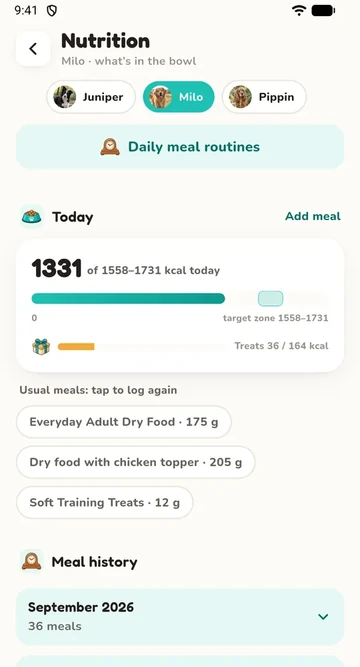 See the real Nutrition interfaceStatic fictional sample-account data, clearly labelled below.
Free account + dog details required. Healthy-adult calorie ranges; puppy feeding needs veterinary guidance. Opening the tool does not start a scan.

A direct route to the tool
The button takes you directly to the supported Nutrition journey. Sign in or create a free account, and add your dog if needed. The free Pup plan can use it.
Use the current healthy-adult estimate with the working shown in the app. The tool needs suitable dog details; it does not calculate from this public page.
Keep meals, treats and food details together. A food record is useful even when a product’s calories are not yet known.
A practical food record
Actual product example
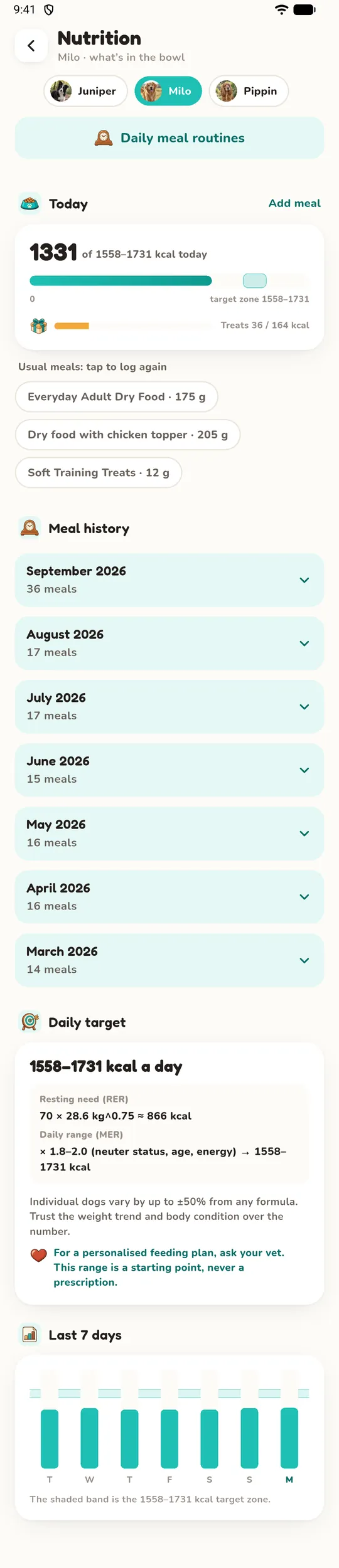
The in-app calculator shows a range and the working behind it. Meals and treats can sit alongside that starting point in your food record.
Opening Nutrition makes no AI scan. Food-label scanning is a separate, explicit action with its own daily allowance. You can also enter food details yourself.
Already have an account? The button below opens Nutrition directly. Signing in or setting up your dog may come first; your details are needed before a suitable range can be shown.
More useful guides
Educational guidance checked 25 October 2026. These organisations do not endorse Dogoos or validate an AI result.
Create a free account and add your dog. Healthy-adult guidance, with your own food and treat details.